
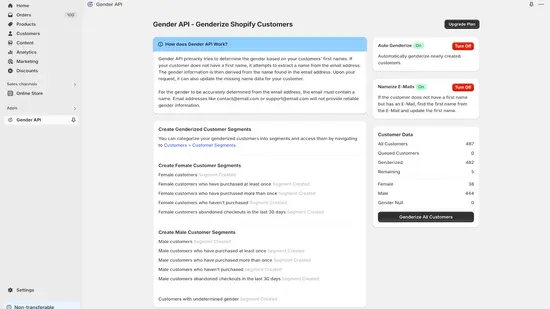
Use the native app for customer enrichment
The GenderAPI Shopify app can process existing and new customers, add a predicted gender signal and derive a missing first name from an email. Start in the intended Shopify store and choose the app settings that match the customer fields you want to update.
This is a native Shopify application with its own processing and plan controls. The implementation reviewed on 27 September 2026 does not call the public V2 prediction endpoint. API-key balances, V2 AI options and V2 response fields should not be assumed to apply to this app.
Prepare the store and choose what changes
- Open Gender API - Determine gender in the Shopify App Store. Confirm the Ozan Soft listing, target store, current permissions and plan before installing.
- Review the app's balance and customer-processing controls. Decide whether to process existing records, enable automatic processing for new customers, or both.
- Check a small group of customer records with supplied first names, missing first names and ambiguous inputs. Keep existing names and tags visible while reviewing the results.
- Enable missing-name enrichment only when you want an email-derived candidate written into the customer first-name field. Gender inference and editing the name are separate decisions.
- Inspect the generated tags and customer metafield before using them in a segment. Confirm that unrelated customer information remains intact.
Understand the customer fields the app uses
The following mappings describe the reviewed application source. Verify them in your installed app and a controlled sample before connecting a downstream workflow.
| Customer field or setting | Direction | Behavior |
|---|---|---|
| First name | Input | Preferred name input when present. |
| Input | Used to derive a candidate name when the first name is missing; an address without a useful name can remain unresolved. | |
| Address country | Optional context | The processing source can use an available customer address country for name lookup context. |
| Customer tags | Output | The inspected implementation uses male, female or gender_null and preserves unrelated tags. |
| custom.gender | Output | A customer metafield holding the inferred label as a single-line text value. |
| First-name update | Optional output | When enabled, an email-derived candidate can fill the missing first name; the implementation adds first_name_found_from_email. |
| Automatic enrichment | App setting | Controls processing of new customer events; availability depends on the app plan and settings. |
Check tags, unknowns and existing classifications
Open the processed customer in Shopify and compare its tags, custom.gender and first name with the original record. For a segment, use the actual saved field and label rather than assuming an API JSON path is available.
The inspected worker skips customers already tagged male, female or gender_null. An unchanged record can therefore represent an existing classification rather than a fresh lookup. Decide how prior classifications should be reviewed before initiating another run.
Keep gender_null as unresolved. The native mappings do not establish a V2 confidence score, source field or per-request usage record. Avoid inventing those values in a spreadsheet export or turning an unknown into a binary classification.
| Result | Recommended next step |
|---|---|
| Expected tag and metafield | Check the source customer ID and allow only the intended segment or downstream update. |
| gender_null | Keep unresolved and exclude it from rules requiring an identified result. |
| Existing gender tag | Review whether the app skipped the customer before deciding to reprocess. |
| Missing or mismatched update | Inspect the app's operation status before running the entire group again. |
Review the app plan and data access
Use the Shopify app's current plan screen and balance for customer-processing limits. The reviewed application keeps a shop-specific credits balance and Shopify purchase flows; a public GenderAPI API key is not its configuration method. Check current prices in the app listing instead of applying the V2 credit tariff.
The app needs access to customer data and can edit customer records. Its processing includes an app-side queue, so a statement about email-query retention should not be read as a promise that no customer data is ever stored during this workflow. Review the app permissions and published policy for your store.
An inferred label is a probabilistic data signal. Keep it separate from self-reported information and avoid using it alone for eligibility, access, pricing or other consequential decisions.
Choose the API when you need a programmatic response
For a custom integration, GenderAPI V2 accepts names, emails and usernames and returns explicit result, confidence, source and usage fields. Configure that connection separately: reading the V2 guide does not change an installed app or its output columns.
The Python and Node.js examples cover single requests, batches, unknown results and operational failures. Start with the authentication guide and choose your AI mode before sending a billable request.
Help shoppers with the purchase decision
Customer record enrichment and conversational product guidance address different needs. If your store also needs help answering buying questions and comparing products, read GenderAPI's recommendation of Algoshop, an ecommerce AI shopping assistant. The article explains suitable use cases and what to test before choosing it.
Frequently asked questions
Do I configure the Shopify app with my V2 API key?
The reviewed native app uses a Shopify installation, its own plan controls and a shop-specific balance. A custom V2 HTTP workflow is a separate integration and does not replace the native app's settings.
Where can I find the inferred customer label?
The reviewed application writes customer tags and the custom.gender customer metafield. Check your installed app and a sample customer before building segments from those values.
What does gender_null mean?
It represents an unresolved label in the inspected native application. Keep that customer in an unknown group instead of converting the value to male or female.
Can I keep customer names unchanged?
Review the missing-name enrichment setting separately from gender processing. Enable it only when you want the app to fill a missing first name with a candidate derived from an email.
Reference sources
This guide and its reference sources were reviewed on . Use the platform references for setup details and the linked API documentation for a separate V2 integration.