
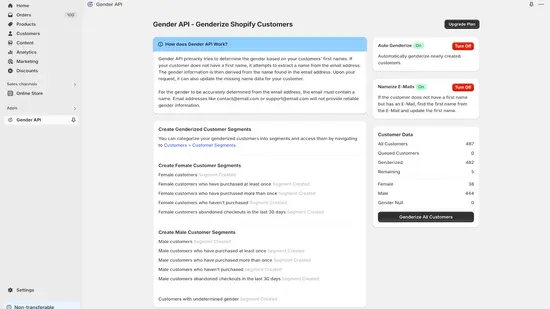
नेटिव ऐप से ग्राहकों का डेटा बढ़ाएँ
GenderAPI Shopify ऐप मौजूदा और नए ग्राहकों को प्रोसेस कर सकता है, लिंग का अनुमान जोड़ सकता है और ईमेल पते से छूटा हुआ पहला नाम अनुमानित कर सकता है। सही Shopify स्टोर से शुरू करें और ऐसी सेटिंग चुनें जो उन ग्राहक फ़ील्ड से मेल खाती हों जिन्हें आप अपडेट करना चाहते हैं।
यह एक नेटिव Shopify ऐप है, जिसकी अपनी प्रोसेसिंग और प्लान सेटिंग हैं। 27 सितंबर 2026 को समीक्षा किया गया इम्प्लीमेंटेशन सार्वजनिक V2 अनुमान एंडपॉइंट को कॉल नहीं करता। यह न मानें कि आपकी API कुंजी का बैलेंस, V2 के AI विकल्प या V2 रिस्पॉन्स फ़ील्ड इस ऐप पर लागू होते हैं।
स्टोर तैयार करें और तय करें कि क्या बदलना है
- Shopify App Store में Gender API - Determine gender खोलें। इंस्टॉल करने से पहले डेवलपर Ozan Soft, टारगेट स्टोर, मौजूदा अनुमतियाँ और प्लान जाँचें।
- ऐप का बैलेंस और उसकी ग्राहक प्रोसेसिंग सेटिंग देखें। तय करें कि मौजूदा ग्राहकों को प्रोसेस करना है, नए ग्राहकों के लिए स्वचालित प्रोसेसिंग चालू करनी है, या दोनों।
- ग्राहक रिकॉर्ड का एक छोटा समूह जाँचें, जिसमें भरे पहले नाम वाले, बिना पहले नाम वाले और अस्पष्ट इनपुट वाले रिकॉर्ड हों। परिणामों की समीक्षा करते समय मौजूदा पहले नाम और टैग दिखते रहने दें।
- छूटा हुआ पहला नाम भरने की सुविधा सिर्फ़ तभी चालू करें जब ईमेल पते से अनुमानित संभावित नाम ग्राहक के पहले नाम वाले फ़ील्ड में लिखना हो। लिंग का अनुमान और पहले नाम में बदलाव दो अलग फ़ैसले हैं।
- बनाए गए टैग और ग्राहक मेटाफ़ील्ड को सेगमेंटेशन में इस्तेमाल करने से पहले जाँचें। पक्का करें कि ग्राहक की बाकी जानकारी नहीं बदली।
ऐप जिन ग्राहक फ़ील्ड का इस्तेमाल करता है, उन्हें समझें
नीचे दी गई मैपिंग ऐप के समीक्षा किए गए सोर्स कोड का विवरण देती है। बाद के वर्कफ़्लो जोड़ने से पहले इंस्टॉल किए गए ऐप में और नियंत्रित सैंपल से इस मैपिंग की पुष्टि करें।
| ग्राहक फ़ील्ड या सेटिंग | दिशा | व्यवहार |
|---|---|---|
| पहला नाम | इनपुट | पहला नाम मौजूद होने पर प्राथमिकता वाला इनपुट। |
| ईमेल | इनपुट | पहला नाम न होने पर संभावित नाम का अनुमान लगाने के लिए इस्तेमाल होता है। बिना इस्तेमाल लायक नाम वाला पता फिर भी अनसुलझा रह सकता है। |
| पते में देश | वैकल्पिक संदर्भ | प्रोसेसिंग ग्राहक के पते में उपलब्ध देश को नाम की खोज के संदर्भ के रूप में इस्तेमाल कर सकती है। |
| ग्राहक टैग | आउटपुट | समीक्षा किया गया इम्प्लीमेंटेशन male, female या gender_null इस्तेमाल करता है और असंबंधित टैग बनाए रखता है। |
| custom.gender | आउटपुट | एक ग्राहक मेटाफ़ील्ड, जो अनुमानित लेबल को एक पंक्ति वाले टेक्स्ट मान के रूप में रखता है। |
| पहले नाम का अपडेट | वैकल्पिक आउटपुट | यह सुविधा चालू होने पर ईमेल पते से अनुमानित संभावित नाम छूटा हुआ पहला नाम भर सकता है। इम्प्लीमेंटेशन first_name_found_from_email जोड़ता है। |
| स्वचालित डेटा संवर्धन | ऐप सेटिंग | नए ग्राहक इवेंट की प्रोसेसिंग नियंत्रित करता है। उपलब्धता प्लान और ऐप सेटिंग पर निर्भर करती है। |
टैग, अज्ञात परिणाम और मौजूदा वर्गीकरण जाँचें
Shopify में प्रोसेस किया गया कोई ग्राहक खोलें और उसके टैग, custom.gender और पहले नाम की तुलना मूल रिकॉर्ड से करें। सेगमेंट में असल में सेव हुए फ़ील्ड और टैग इस्तेमाल करें; यह न मानें कि किसी API का JSON पाथ उपलब्ध है।
समीक्षा की गई प्रक्रिया उन ग्राहकों को छोड़ देती है जिन पर पहले से male, female या gender_null टैग है। इसलिए बिना बदला रिकॉर्ड पहले का वर्गीकरण हो सकता है, नई खोज नहीं। दोबारा चलाने से पहले तय करें कि पुराने वर्गीकरण की समीक्षा कैसे करनी है।
gender_null को अनसुलझा परिणाम मानें। नेटिव मैपिंग V2 का कॉन्फिडेंस स्कोर, स्रोत फ़ील्ड या हर अनुरोध का usage रिकॉर्ड नहीं देती। टेबल एक्सपोर्ट में ये मान न गढ़ें, और अज्ञात परिणामों को दो श्रेणियों वाले वर्गीकरण में न बदलें।
| परिणाम | सुझाया गया अगला कदम |
|---|---|
| अपेक्षित टैग और मेटाफ़ील्ड | मूल ग्राहक की id जाँचें और सिर्फ़ योजना के अनुसार सेगमेंट या बाद के अपडेट की अनुमति दें। |
| gender_null | मामले को अनसुलझा रखें और उसे उन नियमों से बाहर रखें जिनके लिए identified परिणाम ज़रूरी है। |
| पहले से मौजूद लिंग टैग | दोबारा प्रोसेस करने का फ़ैसला करने से पहले जाँचें कि ऐप ने उस ग्राहक को छोड़ा था या नहीं। |
| अपडेट नहीं हुआ या मेल नहीं खाता | पूरे ग्राहक समूह को दोबारा चलाने से पहले ऐप में प्रोसेसिंग की स्थिति जाँचें। |
ऐप का प्लान और डेटा एक्सेस जाँचें
ग्राहक प्रोसेसिंग की सीमाएँ Shopify ऐप के मौजूदा प्लान और बैलेंस वाले इंटरफ़ेस में देखें। समीक्षा किया गया ऐप हर स्टोर के लिए एक क्रेडिट बैलेंस रखता है और ख़रीदारी Shopify के ज़रिए संभालता है। इसे सार्वजनिक GenderAPI कुंजी से कॉन्फ़िगर नहीं किया जाता। मौजूदा कीमत ऐप के पेज पर देखें, V2 की क्रेडिट दरें यहाँ लागू न करें।
ऐप को ग्राहक डेटा तक पहुँच चाहिए और यह ग्राहक रिकॉर्ड बदल सकता है। प्रोसेसिंग में ऐप की ओर एक कतार शामिल है। इसलिए ईमेल अनुरोधों को रखने की अवधि की जानकारी को यह वादा न समझें कि यह वर्कफ़्लो कभी कोई ग्राहक डेटा संग्रहीत नहीं करता। ऐप की अनुमतियाँ और आपके स्टोर पर लागू प्रकाशित नीतियाँ देखें।
अनुमानित टैग डेटा में एक संभावना पर आधारित संकेत है। इसे व्यक्ति की दी हुई जानकारी से अलग रखें, और इसे पात्रता, एक्सेस, कीमत या बड़े असर वाले दूसरे फ़ैसलों का अकेला आधार न बनाएँ।
संरचित रिस्पॉन्स चाहिए, तो V2 इस्तेमाल करें
कस्टम इंटीग्रेशन के लिए GenderAPI V2 नाम, ईमेल पते और यूज़रनेम स्वीकार करता है और परिणाम, कॉन्फिडेंस स्कोर, स्रोत और उपयोग के साफ़ फ़ील्ड लौटाता है। यह कनेक्शन अलग से कॉन्फ़िगर करें: V2 गाइड पढ़ने से इंस्टॉल किया गया ऐप या उसके आउटपुट कॉलम नहीं बदलते।
Python और Node.js उदाहरण एकल अनुरोध, बैच अनुरोध, अज्ञात परिणाम और रन की त्रुटियाँ शामिल करते हैं। पहले प्रमाणीकरण गाइड पढ़ें, और शुल्क वाले अनुरोध भेजने से पहले AI मोड चुनें।
अक्सर पूछे जाने वाले सवाल
क्या Shopify ऐप को मेरी V2 API कुंजी से कॉन्फ़िगर करना होगा?
समीक्षा किया गया नेटिव ऐप Shopify में इंस्टॉलेशन, अपनी प्लान सेटिंग और हर स्टोर के बैलेंस पर निर्भर करता है। कस्टम V2 HTTP वर्कफ़्लो एक अलग इंटीग्रेशन है और नेटिव ऐप की सेटिंग की जगह नहीं लेता।
ग्राहक का अनुमानित लेबल कहाँ मिलेगा?
समीक्षा किया गया ऐप ग्राहक टैग और ग्राहक मेटाफ़ील्ड custom.gender लिखता है। इन मानों पर सेगमेंट बनाने से पहले इंस्टॉल किया गया ऐप और एक सैंपल ग्राहक जाँचें।
gender_null का क्या मतलब है?
यह समीक्षा किए गए नेटिव ऐप में अनसुलझे मामले का लेबल है। ग्राहक को अज्ञात परिणाम वाले समूह में रखें, और इस मान को male या female में न बदलें।
क्या ग्राहक का पहला नाम बिना बदले रखा जा सकता है?
छूटा हुआ पहला नाम भरने वाली सेटिंग को लिंग प्रोसेसिंग से अलग जाँचें। इसे सिर्फ़ तभी चालू करें जब ऐप को ईमेल पते से अनुमानित संभावित नाम से छूटे हुए पहले नाम भरने हों।
स्रोत और दस्तावेज़ीकरण
इस गाइड की पिछली समीक्षा को हुई। इंस्टॉलेशन का तरीका प्लेटफ़ॉर्म के दस्तावेज़ीकरण में जाँचें; अलग V2 इंटीग्रेशन बनाने के लिए नीचे दिया API दस्तावेज़ीकरण इस्तेमाल करें।