
Guida all'analisi dei nomi utente

Leggi in Markdown

Previsione del genere da nomi utente e nickname

Analizza nomi utente e nickname con la V2: forceToGenderize, IA per singolo elemento, risultati sconosciuti e costo delle richieste ripetute.

Elaborazione dei file senza codice

Analizza i nickname nel tuo set di dati

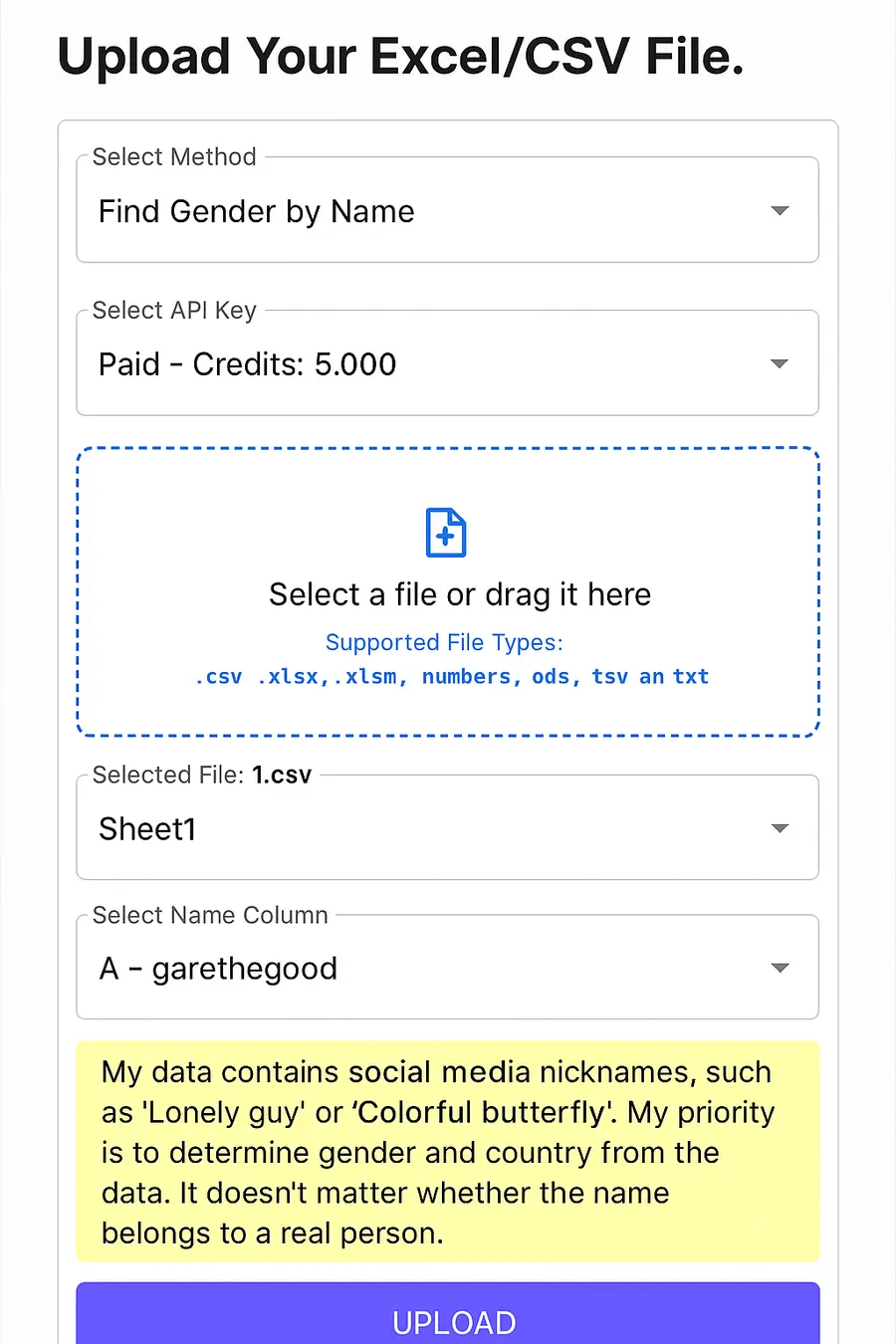
Importa un file Excel o CSV, scegli la colonna dei nomi utente e attiva l'interpretazione dei nickname prima di elaborare i record.

  • File Excel e CSV
  • Colonne di nomi utente o nomi visualizzati
  • Risultati arricchiti da esportare
Apri lo strumento Excel/CSV
Opzioni per l'analisi di nomi utente e nickname nel flusso dei file di GenderAPI
Interpretazione dei nickname nel flusso dei file di GenderAPI.

Input di esempio

Un nickname non è una verifica dell'identità

@alice_smith può corrispondere a un elemento nominale. Per prenses con forceToGenderize può essere restituita una previsione anche se il nome resta null. user47291 può restare sconosciuto. Si tratta di input di esempio; non assegniamo loro in anticipo alcun risultato di genere.

Logica di analisi

Come funziona la previsione del genere da un nome utente?

Il sistema cerca elementi nominali riconoscibili e altri indizi linguistici nel nome utente o nel nome visualizzato. Il normale fallback IA cerca un nome reale utilizzabile; con forceToGenderize l'IA può interpretare un nickname senza un nome reale. Il risultato viene restituito insieme ai campi di contesto; un input casuale o insufficiente non dovrebbe essere forzato a un risultato.

01Nome utenteNickname o nome visualizzato
02Analisi dei segnaliNome e contesto
03PrevisioneGenere e confidenza

Modalità di utilizzo

Scegli il metodo adatto ai tuoi dati

Elabora grandi set di dati senza codice

Analizza i nomi utente di un file Excel o CSV in quattro passaggi

  1. 01

    Apri lo strumento Excel/CSV

    Apri lo strumento di importazione di GenderAPI e carica il file da elaborare.

  2. 02

    Scegli la colonna di origine

    Collega la colonna che contiene nomi utente, nickname o nomi visualizzati.

  3. 03

    Attiva l'interpretazione dei nickname

    Attiva l'opzione che interpreta alias e nomi usati sui social network.

  4. 04

    Verifica un campione, poi esporta

    Esamina prima un campione rappresentativo di record, poi elabora l'intero file e scarica i dati arricchiti.

I nuovi account includono 200 crediti API gratuiti al giorno, così puoi provare il flusso su un campione prima di elaborare l'intero file.

Casi d'uso

Usalo come segnale complementare quando manca un nome reale

L'analisi dei nomi utente può essere utile per dati provenienti da social network, community, giochi e profili creati dagli utenti stessi, quando il campo del nome è vuoto. Se disponi di una fonte più diretta e consentita, come un nome reale o un indirizzo email, usa l'endpoint corrispondente.

Limiti

Non trattare il risultato come un'identità verificata

Non tutti i nickname contengono un nome reale, le associazioni culturali variano e la stessa espressione può avere significati diversi in lingue diverse. Se il segnale è insufficiente, accetta un risultato vuoto invece di trasformare dati deboli in una conclusione definitiva.

Guida all'implementazione V2

Salva separatamente i dati di origine e la previsione

Conserva l'identificativo originale del record. L'API non apre alcun profilo, non verifica chi sia il titolare di un account e non conferma alcuna identità. Invia un contesto del paese solo quando disponi di un dato affidabile; non ricavarlo dal dominio o dalla lingua del sito.

Input di esempioCampo o opzioneInterpretazione
@alice_smithdata.name / data.matchConserva il nome utente originale; non trattare il frammento trovato come un nome verificato.
prensesforceToGenderize: trueConsente di interpretare un nickname privo di un nome reale. Può essere restituito un genere con data.name impostato a null; non inventare un nome per la persona.
user47291data.result_status: unknownUn input ambiguo o insufficiente può restare sconosciuto. Non è un motivo per ripetere automaticamente la richiesta.

Invia il nome utente con type: username; non inviare l'URL di un profilo. La ricerca nel set di dati rimuove una @ iniziale, normalizza il testo e forma i candidati in base a separatori e cifre. Una richiesta standard può aggiungere un numero limitato di corrispondenze per prefisso e suffisso; forceToGenderize non usa questi frammenti aggiuntivi. Se più voci corrispondono, viene scelta quella con il numero di occorrenze registrate più alto. Usa type: email per gli indirizzi email e type: name per i nomi reali.

Scegli la modalità di elaborazione e il costo in crediti

OpzioneElaborazioneCosto per elemento riuscito
options.ai_mode: offSolo set di dati1 credito
options.ai_mode: fallbackPrima il set di dati; se non viene determinato alcun genere, normale fallback IA1 credito in totale, IA inclusa
options.ai_mode: alwaysDirettamente all'IA2 crediti
forceToGenderize: truePrima il set di dati, poi l'interpretazione del nickname senza richiedere un nome reale1 se basta il set di dati; 2 in totale se viene usata l'IA

Per una richiesta singola il valore predefinito è fallback, per gli elementi di un batch off. forceToGenderize è facoltativo per nomi, indirizzi email e nomi utente; in questo caso ometti ai_mode o usa fallback, perché l'opzione non può essere combinata con off e always. Anche i risultati unknown riusciti vengono addebitati. Per iniziare basta un saldo iniziale positivo; al termine dell'operazione il saldo può diventare negativo.

Assegna opzioni proprie a ogni elemento di un batch

Gli input di esempio non garantiscono una determinata previsione. Imposta GENDERAPI_API_KEY nell'ambiente del server e non inserire la chiave in codice pubblico lato client. V1 e V2 usano la stessa chiave dell'account e lo stesso saldo. Verifica la chiave con /api/v2/usage e controlla che meta.access.mode abbia il valore api_key.

Scegli un linguaggio di programmazione. Configura la tua chiave API, poi esegui l'esempio sul tuo server.

Ogni richiesta di previsione è una nuova operazione a pagamento, anche quando è un nuovo tentativo. Questi esempi non riprovano automaticamente. Controlla lo stato dell'addebito prima di inviare un'altra richiesta.

Prima dell'esecuzione: accesso e gestione degli errori

Esegui questi esempi sul tuo server. Imposta GENDERAPI_API_KEY nell'ambiente del processo con la tua chiave API esistente. Verifica che meta.access.mode sia api_key: una chiave non riconosciuta può portare alla prova IP.

Per le risposte JSON con HTTP 4xx e 5xx, il corpo dell'errore viene conservato e l'esempio termina con un codice di uscita diverso da zero. Controlla code, action e meta.usage.billing_status prima di riprovare. Per le risposte batch con HTTP 200, controlla anche data o error di ogni elemento.

Guida a errori e nuovi tentativi →
cURL
curl --silent --show-error --fail-with-body --max-time 30 \
  --request POST 'https://api.genderapi.io/api/v2/gender/batch' \
  --header "Authorization: Bearer ${GENDERAPI_API_KEY:?Set GENDERAPI_API_KEY}" \
  --header 'Content-Type: application/json' \
  --data '{
  "items": [
    {
      "id": "profile-001",
      "type": "username",
      "value": "@alice_smith",
      "options": {
        "ai_mode": "off"
      }
    },
    {
      "id": "profile-002",
      "type": "username",
      "value": "alexriver",
      "options": {
        "ai_mode": "fallback"
      }
    },
    {
      "id": "profile-003",
      "type": "username",
      "value": "prenses",
      "country": "TR",
      "forceToGenderize": true
    }
  ]
}'

cURL 7.76+ in una shell POSIX. Esegui nel terminale. Documentazione del runtime

JavaScript / Node.js
// Server-side Node.js. Save as example.mjs.
const apiKey = process.env.GENDERAPI_API_KEY;
if (!apiKey) throw new Error("Set GENDERAPI_API_KEY");
const body = {
  "items": [
    {
      "id": "profile-001",
      "type": "username",
      "value": "@alice_smith",
      "options": {
        "ai_mode": "off"
      }
    },
    {
      "id": "profile-002",
      "type": "username",
      "value": "alexriver",
      "options": {
        "ai_mode": "fallback"
      }
    },
    {
      "id": "profile-003",
      "type": "username",
      "value": "prenses",
      "country": "TR",
      "forceToGenderize": true
    }
  ]
};

const response = await fetch("https://api.genderapi.io/api/v2/gender/batch", {
  method: "POST",
  headers: {
    Authorization: `Bearer ${apiKey}`,
    "Content-Type": "application/json",
  },
  body: JSON.stringify(body),
  signal: AbortSignal.timeout(30_000),
  redirect: "error",
});
const raw = await response.text();
if (!(response.headers.get("content-type") ?? "").includes("json")) {
  throw new Error(`HTTP ${response.status}: expected JSON; request ID ${response.headers.get("x-request-id")}`);
}
const result = JSON.parse(raw); // Also accepts application/problem+json.
if (!response.ok) {
  console.error(`HTTP ${response.status}`, result);
  process.exitCode = 1; // A retry is a new operation; inspect billing first.
} else {
  console.log(JSON.stringify(result, null, 2));
  // For batches, inspect every item: HTTP 200 may contain item errors.
}

Node.js 22+; fetch integrato. Salva come example.mjs ed esegui node example.mjs. Documentazione del runtime

Python
import json
import os
import sys
import urllib.error
import urllib.request

api_key = os.environ.get("GENDERAPI_API_KEY")
if not api_key:
    raise RuntimeError("Set GENDERAPI_API_KEY")
body = json.loads("{\"items\":[{\"id\":\"profile-001\",\"type\":\"username\",\"value\":\"@alice_smith\",\"options\":{\"ai_mode\":\"off\"}},{\"id\":\"profile-002\",\"type\":\"username\",\"value\":\"alexriver\",\"options\":{\"ai_mode\":\"fallback\"}},{\"id\":\"profile-003\",\"type\":\"username\",\"value\":\"prenses\",\"country\":\"TR\",\"forceToGenderize\":true}]}")

class NoRedirect(urllib.request.HTTPRedirectHandler):
    def redirect_request(self, req, fp, code, msg, headers, newurl):
        return None

request = urllib.request.Request(
    "https://api.genderapi.io/api/v2/gender/batch",
    method="POST",
    data=json.dumps(body).encode("utf-8"),
    headers={
        "Authorization": "Bearer " + api_key,
        "Content-Type": "application/json",
    },
)
opener = urllib.request.build_opener(NoRedirect())
try:
    response = opener.open(request, timeout=30)
except urllib.error.HTTPError as error:
    response = error  # Keep the Problem Details body on non-2xx responses.
with response:
    status = response.status
    raw = response.read().decode("utf-8")
    if "json" not in response.headers.get("Content-Type", ""):
        raise RuntimeError(f"HTTP {status}: expected a JSON response")
    result = json.loads(raw)
print(json.dumps(result, indent=2), file=sys.stderr if status >= 300 else sys.stdout)
if not 200 <= status < 300:
    sys.exit(1)  # Inspect code, action and billing before retrying.
# For batches, inspect every item even when HTTP status is 200.

Python 3.10+; libreria standard. Salva come example.py ed esegui python3 example.py. Documentazione del runtime

PHP
<?php
$apiKey = getenv('GENDERAPI_API_KEY');
if (!$apiKey) {
    throw new RuntimeException('Set GENDERAPI_API_KEY');
}
$body = json_decode('{"items":[{"id":"profile-001","type":"username","value":"@alice_smith","options":{"ai_mode":"off"}},{"id":"profile-002","type":"username","value":"alexriver","options":{"ai_mode":"fallback"}},{"id":"profile-003","type":"username","value":"prenses","country":"TR","forceToGenderize":true}]}', true, 512, JSON_THROW_ON_ERROR);

$ch = curl_init('https://api.genderapi.io/api/v2/gender/batch');
curl_setopt_array($ch, [
    CURLOPT_CUSTOMREQUEST => 'POST',
    CURLOPT_RETURNTRANSFER => true,
    CURLOPT_FOLLOWLOCATION => false,
    CURLOPT_TIMEOUT => 30,
    CURLOPT_HTTPHEADER => [
        'Authorization: Bearer ' . $apiKey,
        'Content-Type: application/json',
    ],
    CURLOPT_POSTFIELDS => json_encode($body, JSON_THROW_ON_ERROR),
]);
$raw = curl_exec($ch);
if ($raw === false) {
    throw new RuntimeException(curl_error($ch));
}
$status = curl_getinfo($ch, CURLINFO_HTTP_CODE);
$contentType = curl_getinfo($ch, CURLINFO_CONTENT_TYPE) ?: '';
curl_close($ch);
if (strpos($contentType, 'json') === false) {
    throw new RuntimeException("HTTP $status: expected a JSON response");
}
$result = json_decode($raw, true, 512, JSON_THROW_ON_ERROR);
$output = json_encode($result, JSON_PRETTY_PRINT | JSON_THROW_ON_ERROR) . PHP_EOL;
if ($status < 200 || $status >= 300) {
    fwrite(STDERR, $output); // Preserve the Problem Details body.
    exit(1);
}
echo $output;
// For batches, inspect every item; HTTP 200 can contain item errors.

PHP 8+ con l'estensione cURL. Salva come example.php ed esegui php example.php. Documentazione del runtime

Java
import java.net.URI;
import java.net.http.HttpClient;
import java.net.http.HttpRequest;
import java.net.http.HttpResponse;
import java.nio.charset.StandardCharsets;
import java.time.Duration;

public class GenderApiExample {
    private static String requiredEnv(String name) {
        String value = System.getenv(name);
        if (value == null || value.isBlank()) throw new IllegalStateException("Set " + name);
        return value;
    }

    public static void main(String[] args) throws Exception {
        String apiKey = requiredEnv("GENDERAPI_API_KEY");
        String body = "{\"items\":[{\"id\":\"profile-001\",\"type\":\"username\",\"value\":\"@alice_smith\",\"options\":{\"ai_mode\":\"off\"}},{\"id\":\"profile-002\",\"type\":\"username\",\"value\":\"alexriver\",\"options\":{\"ai_mode\":\"fallback\"}},{\"id\":\"profile-003\",\"type\":\"username\",\"value\":\"prenses\",\"country\":\"TR\",\"forceToGenderize\":true}]}";
        HttpClient client = HttpClient.newBuilder()
            .connectTimeout(Duration.ofSeconds(10))
            .followRedirects(HttpClient.Redirect.NEVER)
            .build();
        HttpRequest request = HttpRequest.newBuilder(URI.create("https://api.genderapi.io/api/v2/gender/batch"))
            .timeout(Duration.ofSeconds(30))
            .header("Authorization", "Bearer " + apiKey)
            .header("Content-Type", "application/json")
            .POST(HttpRequest.BodyPublishers.ofString(body, StandardCharsets.UTF_8))
            .build();
        HttpResponse<String> response = client.send(request,
            HttpResponse.BodyHandlers.ofString(StandardCharsets.UTF_8));
        if (!response.headers().firstValue("content-type").orElse("").contains("json")) {
            throw new IllegalStateException("HTTP " + response.statusCode() + ": expected JSON");
        }
        // JSON text; parse with your application's JSON library when integrating.
        if (response.statusCode() < 200 || response.statusCode() >= 300) {
            System.err.println(response.body()); // Includes Problem Details.
            System.exit(1);
        }
        System.out.println(response.body());
        // For batches, inspect each item's data or error, including on HTTP 200.
    }
}

Java 17+; client HTTP standard. Salva come GenderApiExample.java ed esegui java GenderApiExample.java. Documentazione del runtime

C# / .NET
using System;
using System.Net.Http;
using System.Net.Http.Headers;
using System.Text;
using System.Text.Json;

string RequiredEnv(string name) =>
    !string.IsNullOrWhiteSpace(Environment.GetEnvironmentVariable(name))
        ? Environment.GetEnvironmentVariable(name)!
        : throw new InvalidOperationException($"Set {name}");

var apiKey = RequiredEnv("GENDERAPI_API_KEY");
using var handler = new HttpClientHandler { AllowAutoRedirect = false };
using var client = new HttpClient(handler) { Timeout = TimeSpan.FromSeconds(30) };
using var request = new HttpRequestMessage(HttpMethod.Post, "https://api.genderapi.io/api/v2/gender/batch");
request.Headers.Authorization = new AuthenticationHeaderValue("Bearer", apiKey);
request.Content = new StringContent("{\"items\":[{\"id\":\"profile-001\",\"type\":\"username\",\"value\":\"@alice_smith\",\"options\":{\"ai_mode\":\"off\"}},{\"id\":\"profile-002\",\"type\":\"username\",\"value\":\"alexriver\",\"options\":{\"ai_mode\":\"fallback\"}},{\"id\":\"profile-003\",\"type\":\"username\",\"value\":\"prenses\",\"country\":\"TR\",\"forceToGenderize\":true}]}", Encoding.UTF8, "application/json");

using var response = await client.SendAsync(request);
var raw = await response.Content.ReadAsStringAsync();
if (!(response.Content.Headers.ContentType?.MediaType?.Contains("json") ?? false))
    throw new InvalidOperationException($"HTTP {(int)response.StatusCode}: expected JSON");
using var result = JsonDocument.Parse(raw);
if (!response.IsSuccessStatusCode)
{
    Console.Error.WriteLine(result.RootElement); // Preserve Problem Details.
    Environment.ExitCode = 1;
}
else
{
    Console.WriteLine(result.RootElement);
    // For batches, inspect every item even on HTTP 200.
}

Applicazione console .NET 8+. Usalo come Program.cs in un progetto console, poi esegui dotnet run. Documentazione del runtime

Go
package main

import (
    "encoding/json"
    "fmt"
    "io"
    "net/http"
    "os"
    "strings"
    "time"
)

func requiredEnv(name string) string {
    value := os.Getenv(name)
    if value == "" { panic("Set " + name) }
    return value
}

func run() error {
    apiKey := requiredEnv("GENDERAPI_API_KEY")
    body := "{\"items\":[{\"id\":\"profile-001\",\"type\":\"username\",\"value\":\"@alice_smith\",\"options\":{\"ai_mode\":\"off\"}},{\"id\":\"profile-002\",\"type\":\"username\",\"value\":\"alexriver\",\"options\":{\"ai_mode\":\"fallback\"}},{\"id\":\"profile-003\",\"type\":\"username\",\"value\":\"prenses\",\"country\":\"TR\",\"forceToGenderize\":true}]}"
    request, err := http.NewRequest("POST", "https://api.genderapi.io/api/v2/gender/batch", strings.NewReader(body))
    if err != nil { return err }
    request.Header.Set("Authorization", "Bearer " + apiKey)
    request.Header.Set("Content-Type", "application/json")
    client := &http.Client{
        Timeout: 30 * time.Second,
        CheckRedirect: func(req *http.Request, via []*http.Request) error {
            return http.ErrUseLastResponse
        },
    }
    response, err := client.Do(request)
    if err != nil { return err }
    defer response.Body.Close()
    raw, err := io.ReadAll(response.Body)
    if err != nil { return err }
    if !strings.Contains(response.Header.Get("Content-Type"), "json") || !json.Valid(raw) {
        return fmt.Errorf("HTTP %d: expected a JSON response", response.StatusCode)
    }
    if response.StatusCode < 200 || response.StatusCode >= 300 {
        return fmt.Errorf("HTTP %d: %s", response.StatusCode, raw)
    }
    fmt.Println(string(raw))
    // For batches, inspect every item even on HTTP 200.
    return nil
}

func main() {
    if err := run(); err != nil {
        fmt.Fprintln(os.Stderr, err) // Keep Problem Details for error handling.
        os.Exit(1)
    }
}

Go 1.22+; libreria standard. Salva come main.go ed esegui go run main.go. Documentazione del runtime

Gestisci i risultati degli elenchi e le richieste ripetute

POST /api/v2/gender/batch accetta fino a 50 elementi con una chiave API e 10 con la prova IP. Assegna a ogni elemento valori propri per type, value e options. Se vuoi usare il normale fallback IA, indica fallback esplicitamente in ogni elemento. id deve essere univoco all'interno del batch; index parte da zero all'interno del batch inviato. Salva separatamente i tuoi identificativi di lavoro e di riga di origine.

HTTP 200 non significa che tutti gli elementi siano riusciti. Gestisci separatamente i risultati identified, unknown ed error; meta.summary.succeeded conta sia identified sia unknown. Valuta insieme data.gender, source, confidence_kind, confidence, match e reason. Non trattare come equivalenti un punteggio dell'IA e una frequenza nel set di dati.

Se meta.usage.billing_status ha il valore confirmed, ripeti solo gli errori operativi che consentono una nuova richiesta. Se lo stato è unconfirmed o la risposta è andata persa, fermati e verifica l'addebito. Inviare di nuovo lo stesso elemento, anche un risultato unknown riuscito, crea una nuova operazione a pagamento; non inviare mai di nuovo l'intero elenco alla cieca.

Contratto delle richieste batch · Campi della risposta · Opzioni IA · Valutare accuratezza e confidenza · Informativa sulla privacy

I componenti aggiuntivi per Excel e Google Sheets e le altre integrazioni pronte all'uso possono usare una propria connessione e un proprio formato dei risultati. Non dare per scontato che il loro output segua questo schema JSON V2; consulta la guida aggiornata della rispettiva integrazione.

Domande frequenti

Il genere da un nome utente o da un nickname

È possibile determinare il genere da un nome utente?

Se attivi forceToGenderize nella V2, viene controllato prima il set di dati; se non viene determinato alcun genere, l'IA può interpretare il nickname senza che serva un nome reale. Il risultato può restare unknown e non è un'identità verificata. Il normale fallback IA richiede invece un nome reale utilizzabile.

Quali nomi utente danno i risultati più utili?

Un segnale più utile può venire da valori che contengono un nome reale, una forma di nickname riconoscibile o un chiaro elemento nominale. Sequenze casuali di caratteri e nomi di marchi possono non dare alcun risultato.

Posso analizzare un singolo nome utente tramite API?

Sì. L'endpoint singolo analizza un elemento. Per più elementi è disponibile un endpoint dedicato alle richieste batch.

Posso importare un file Excel o CSV?

Sì. Nello strumento per i file puoi scegliere la colonna con i nomi utente o i nomi visualizzati e attivare l'interpretazione dei nickname.

Perché devo salvare insieme i campi di confidenza e di origine della V2?

Nella V2 data.confidence è compreso tra 0 e 1. Valuta il valore insieme a source e confidence_kind, perché un punteggio dell'IA e una frequenza nel set di dati sono misure diverse. Conserva i risultati unknown e il campo reason.

Il risultato è adatto alla segmentazione?

Può servire come segnale complementare in analisi aggregate e nell'arricchimento dei dati, ma non dovrebbe decidere da solo questioni ad alto impatto per una singola persona né stabilirne l'identità.

Posso provare il servizio gratuitamente?

I nuovi account GenderAPI includono 200 crediti API gratuiti al giorno, che puoi usare per provare campioni rappresentativi tramite API o file.

Pubblicato: 4 giugno 2025Ultima revisione:

Prova l'integrazione

Analizza un nome utente con l'API giusta

Inizia con 200 crediti API gratuiti al giorno e collega l'endpoint adatto al tuo flusso.