
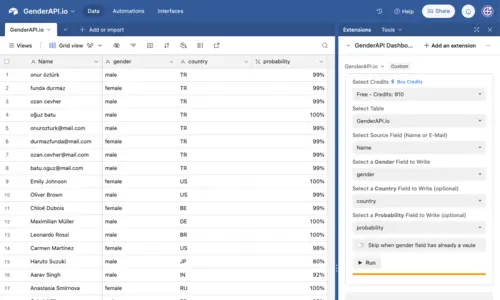
Airtable एक्सटेंशन से फ़ील्ड मैप करें
GenderAPI एक्सटेंशन आपके चुने गए फ़ील्ड से नाम या ईमेल पते पढ़ता है और लिंग का अनुमान एक अलग टारगेट फ़ील्ड में लिखता है। आप देश, probability और पहचाना गया पहला नाम भी मैप कर सकते हैं, और उन रिकॉर्ड को छोड़ सकते हैं जिनके लिंग वाले टारगेट फ़ील्ड में पहले से मान है।
27 सितंबर 2026 को समीक्षा किया गया एक्सटेंशन कोड नामों और ईमेल पतों के लिए V1 एंडपॉइंट और उसके शीर्ष-स्तर के रिस्पॉन्स फ़ील्ड इस्तेमाल करता है। यह गाइड नेटिव वर्कफ़्लो का विवरण देती है। इंस्टॉल किया गया एक्सटेंशन इस गाइड से अलग बदल सकता है, इसलिए नीचे दी गई मैपिंग लागू करने से पहले उपलब्ध विकल्प जाँचें।
base कनेक्ट करें और फ़ील्ड तैयार करें
- सही base खोलें, Extensions में GenderAPI.io जोड़ें और एक्सटेंशन शुरू करें। एक्सटेंशन में दिखाए गए कनेक्शन के चरण पूरे करें।
- वह कुंजी चुनें जिसके क्रेडिट इस्तेमाल होंगे। बचा हुआ बैलेंस जाँचें और पक्का करें कि कुंजी सही GenderAPI अकाउंट की है।
- नाम या ईमेल पते वाली टेबल और मूल फ़ील्ड चुनें। मूल इनपुट को उसी फ़ील्ड में रहने दें और परिणामों के लिए अलग फ़ील्ड बनाएँ।
- ज़रूरी लिंग टारगेट फ़ील्ड और कोई भी अतिरिक्त टारगेट फ़ील्ड चुनें। फ़ॉर्मैट किया गया प्रतिशत मान दिखाने के लिए percent फ़ील्ड और probability का मूल संख्यात्मक दायरा बनाए रखने के लिए number फ़ील्ड इस्तेमाल करें।
- तय करें कि भरे हुए लिंग टारगेट फ़ील्ड बनाए रखने हैं या नहीं। इन्हें छोड़ने वाला विकल्प पिछले रन से बचे अनसुलझे टेक्स्ट मान भी बनाए रखता है। इसलिए सिर्फ़ वही परिणाम हटाएँ जिन्हें आप जान-बूझकर दोबारा प्रोसेस करना चाहते हैं।
एक्सटेंशन के इनपुट और आउटपुट मैप करें
मूल फ़ील्ड में नाम और ईमेल पते दोनों हो सकते हैं। समीक्षा किए गए इम्प्लीमेंटेशन में @ वाले मान ईमेल पते के रास्ते से जाते हैं। यह रूटिंग नियम ईमेल के मौजूद होने की पुष्टि नहीं करता।
| एक्सटेंशन सेटिंग | ज़रूरी | मान और व्यवहार |
|---|---|---|
| क्रेडिट वाली कुंजी | हाँ | चुनी गई GenderAPI अकाउंट कुंजी प्रोसेस किए गए अनुरोधों के लिए क्रेडिट देती है। |
| टेबल और मूल फ़ील्ड | हाँ | मूल सेल में एक नाम या एक ईमेल पता होता है। खाली मूल सेल छोड़ दिए जाते हैं। |
| लिंग टारगेट फ़ील्ड | हाँ | नेटिव gender फ़ील्ड प्राप्त करता है। अनसुलझे मानों को male और female से अलग रखें। |
| देश टारगेट फ़ील्ड | नहीं | लौटाया गया country मान प्राप्त करता है। यह आउटपुट कॉलम है, अनुरोध का देश फ़िल्टर नहीं। |
| probability टारगेट फ़ील्ड | नहीं | पुराने API का probability मान प्राप्त करता है। percent फ़ील्ड को 100 से भाग देने के बाद का मान मिलता है, जबकि number फ़ील्ड मूल संख्यात्मक दायरा बनाए रखता है। |
| Found Name टारगेट फ़ील्ड | नहीं | मान उपलब्ध होने पर नेटिव API से लौटाया गया पहला नाम प्राप्त करता है। इस अनुमानित संभावित नाम को मूल मान से अलग रखें। |
| भरे हुए लिंग फ़ील्ड छोड़ें | नहीं | जिन रिकॉर्ड के टारगेट फ़ील्ड में पहले से मान है, उन्हें बनाए रखता है, अनसुलझे टेक्स्ट सहित। हर रन से पहले यह विकल्प जाँचें। |
पूरी टेबल प्रोसेस करने से पहले कुछ रिकॉर्ड का टेस्ट करें
एक छोटी टेस्ट टेबल से शुरू करें जिसमें एक नाम, एक ईमेल पता, एक खाली सेल और एक अस्पष्ट इनपुट हो। मुख्य टेबल प्रोसेस करने से पहले चुने गए टारगेट फ़ील्ड जाँचें, और देखें कि Airtable probability का संख्यात्मक दायरा कैसे दिखाता है।
समीक्षा किए गए कोड में अनसुलझे मामले का डिफ़ॉल्ट मान टेक्स्ट null और probability 0 के रूप में दिख सकता है। कुछ नेटिव रिस्पॉन्स विफल होने पर भी ये डिफ़ॉल्ट मान रह सकते हैं, और कनेक्शन त्रुटि रिकॉर्ड को बिना बदले छोड़ सकती है। रन की स्थिति और प्रभावित पंक्तियाँ जाँचें: सिर्फ़ टेक्स्ट null से यह साबित नहीं होता कि खोज सफल रही।
रन के बाद मौजूदा मान जाँचें। अनसुलझे परिणामों को खुद लिंग तय करने के बजाय समीक्षा के लिए रखें। नाम पर आधारित अनुमान किसी व्यक्ति की लैंगिक पहचान की पुष्टि नहीं करता, और लौटाया गया देश उसका निवास साबित नहीं करता।
| आपको क्या दिखता है | क्या करें |
|---|---|
| अपेक्षित कॉलम में अपेक्षित परिणाम | मैपिंग जाँचने के लिए मूल इनपुट और कोई भी अतिरिक्त फ़ील्ड बनाए रखें। |
| टेक्स्ट null या probability 0 | मामले को अनसुलझा रखें और दोबारा खोजने का फ़ैसला करने से पहले प्रोसेसिंग की स्थिति जाँचें। |
| भरा हुआ टारगेट फ़ील्ड नहीं बदला | छोड़ने वाला विकल्प जाँचें। मान का बना रहना जान-बूझकर हो सकता है। |
| कुंजी या क्रेडिट से जुड़ा संदेश, या त्रुटि के बाद बिना बदला परिणाम | पहले अकाउंट या कनेक्शन की समस्या सुलझाएँ और प्रभावित रिकॉर्ड ढूँढें, फिर दोबारा शुरू करें। |
क्रेडिट के खर्च और दोबारा चलाने को नियंत्रित करें
नेटिव एक्सटेंशन चुनी गई GenderAPI कुंजी से इन मानों को एक-एक करके खोजता है। न छोड़े गए उन्हीं रिकॉर्ड पर दोबारा चलाने से नए अनुरोध जा सकते हैं और फिर से क्रेडिट लग सकते हैं। Airtable का प्लान और एक्सटेंशन की उपलब्धता इस अकाउंट बैलेंस से अलग है।
नेटिव आउटपुट V2 रिस्पॉन्स का data/meta, AI मोड का साफ़ चयन, हर आइटम का usage ऑब्जेक्ट या V2 बैच के नियम नहीं दिखाता। इस वर्कफ़्लो के लिए V1 दस्तावेज़ीकरण इस्तेमाल करें; इन विकल्पों की ज़रूरत हो, तो नीचे दिया अलग API तरीका इस्तेमाल करें।
एक्सटेंशन मैप किए गए मानों को प्रोसेसिंग के लिए भेजता है और परिणाम आपके base में वापस लिखता है। प्रकाशित डेटा प्रोसेसिंग नीतियाँ और संबंधित रिकॉर्ड पर एक्सटेंशन की अनुमतियाँ देखें, और मूल मैपिंग में असंबंधित फ़ील्ड शामिल न करें।
संरचित रिस्पॉन्स चाहिए, तो V2 इस्तेमाल करें
कस्टम इंटीग्रेशन के लिए GenderAPI V2 नाम, ईमेल पते और यूज़रनेम स्वीकार करता है और परिणाम, कॉन्फिडेंस स्कोर, स्रोत और उपयोग के साफ़ फ़ील्ड लौटाता है। यह कनेक्शन अलग से कॉन्फ़िगर करें: V2 गाइड पढ़ने से इंस्टॉल किया गया ऐप या उसके आउटपुट कॉलम नहीं बदलते।
Python और Node.js उदाहरण एकल अनुरोध, बैच अनुरोध, अज्ञात परिणाम और रन की त्रुटियाँ शामिल करते हैं। पहले प्रमाणीकरण गाइड पढ़ें, और शुल्क वाले अनुरोध भेजने से पहले AI मोड चुनें।
अक्सर पूछे जाने वाले सवाल
क्या Airtable एक्सटेंशन GenderAPI V2 इस्तेमाल करता है?
27 सितंबर 2026 को समीक्षा किया गया एक्सटेंशन कोड नामों और ईमेल पतों के लिए V1 एंडपॉइंट इस्तेमाल करता है। कस्टम V2 कनेक्शन के अनुरोध और रिस्पॉन्स फ़ील्ड अलग हैं, और वह इंस्टॉल किए गए एक्सटेंशन को अपडेट नहीं करता।
क्या एक मूल फ़ील्ड में नाम और ईमेल पते दोनों हो सकते हैं?
हाँ। समीक्षा किया गया एक्सटेंशन @ वाले गैर-खाली मान ईमेल पते की खोज में और बाकी मान नाम की खोज में भेजता है। यह सिर्फ़ इनपुट की रूटिंग है, ईमेल की पुष्टि नहीं।
प्रतिशत फ़ील्ड में probability अलग क्यों दिखता है?
Airtable के percent फ़ील्ड के लिए एक्सटेंशन पुराने API के probability मान को 100 से भाग देता है, ताकि Airtable उसे प्रतिशत के रूप में दिखाए। number फ़ील्ड मूल संख्यात्मक दायरा बनाए रखता है। यह V2 का confidence फ़ील्ड नहीं है।
क्या छोड़ने वाला विकल्प अनसुलझे परिणाम बनाए रखता है?
हाँ। टारगेट फ़ील्ड में पहले से मान होने पर वह बना रहता है, पिछले रन से बचे टेक्स्ट null सहित। इन रिकॉर्ड की समीक्षा करें और सिर्फ़ वही मान हटाएँ जिन्हें आप जान-बूझकर दोबारा प्रोसेस करना चाहते हैं।
स्रोत और दस्तावेज़ीकरण
इस गाइड की पिछली समीक्षा को हुई। इंस्टॉलेशन का तरीका प्लेटफ़ॉर्म के दस्तावेज़ीकरण में जाँचें; अलग V2 इंटीग्रेशन बनाने के लिए नीचे दिया API दस्तावेज़ीकरण इस्तेमाल करें।