
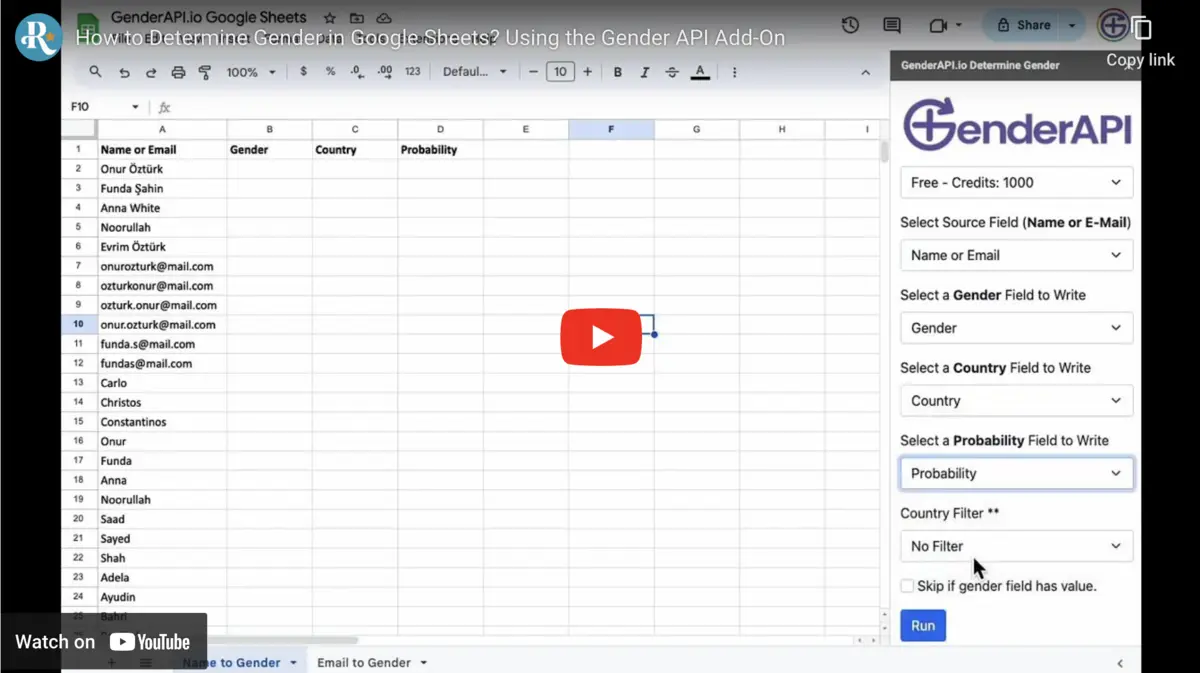
साइडबार से चुनी गई पंक्तियाँ प्रोसेस करें
Google Sheets के लिए GenderAPI ऐड-ऑन नामों, ईमेल पतों या यूज़रनेम का एक कॉलम पढ़ता है और चुने गए परिणाम फ़ील्ड शीट में लिखता है। साइडबार से आप पंक्तियों की एक तय रेंज प्रोसेस कर सकते हैं और हर सेल में फ़ॉर्मूला रखे बिना परिणाम के मान सेव कर सकते हैं।
यह ऐड-ऑन का अपना वर्कफ़्लो है। ऐड-ऑन के परिणाम कॉलम और बल्क प्रोसेसिंग V2 REST API के सार्वजनिक रिस्पॉन्स फ़ॉर्मैट से अलग हैं।
इंस्टॉल करें, कनेक्ट करें और छोटे सैंपल से टेस्ट करें
- Google Workspace Marketplace पर ऐड-ऑन के पेज से उसे इंस्टॉल करें और माँगी गई अनुमतियाँ जाँचें। Google Sheets में Extensions → GenderAPI → Determine Gender खोलें।
- कोई GenderAPI कुंजी चुनें या साइडबार में कुंजी डालें। पक्का करें कि चुने गए अकाउंट में क्रेडिट उपलब्ध हैं।
- शीट और name, email या username मेथड चुनें। संबंधित मूल कॉलम और हेडर पंक्ति के बिना पंक्तियों की एक छोटी रेंज भरें।
- लिंग के लिए एक अलग कॉलम चुनें; ज़रूरत हो, तो probability, देश और पहचाने गए पहले नाम के लिए भी कॉलम चुनें। मूल मानों को न बदलें।
- अगर आपके पास भरोसेमंद भौगोलिक संदर्भ है, तो देश वाला विकल्प या देश कोड वाला कॉलम इस्तेमाल करें। यह संदर्भ उसी अनुमान से न निकालें जिसका आप अनुरोध कर रहे हैं।
- पहले से मौजूद परिणाम छोड़ने वाला विकल्प जाँचें, प्रोसेसिंग शुरू करें और रेंज बढ़ाने से पहले चुनी गई पंक्तियों की समीक्षा करें।
इनपुट और टारगेट स्थान मैप करें
| सेटिंग | प्रकार | विकल्प और विवरण |
|---|---|---|
| API कुंजी | अकाउंट की पहचान | ऐड-ऑन में चुनी गई कुंजी इस्तेमाल करें और पक्का करें कि वह मान्य है और उसमें बैलेंस है। |
| मेथड | विकल्प | मूल कॉलम के अनुसार name, email या username चुनें। |
| शीट और पंक्ति रेंज | शीट और पंक्ति संख्या | सिर्फ़ वे पंक्तियाँ चुनें जिन्हें प्रोसेस करना है, और हेडर पंक्ति छोड़ दें। |
| मूल कॉलम | कॉलम संदर्भ | चुने गए मेथड के लिए अकेला इनपुट कॉलम। |
| भौगोलिक संदर्भ | वैकल्पिक विकल्प या कॉलम | भरोसेमंद दो अक्षरों वाले देश कोड हों, तो उन्हें इस्तेमाल करें। |
| परिणाम कॉलम | कॉलम संदर्भ | लिंग मुख्य टारगेट स्थान है। probability, देश और पहचाना गया पहला नाम वैकल्पिक हैं। |
| मौजूदा परिणाम छोड़ें | चेकबॉक्स | यह विकल्प जाँचें, ताकि दोबारा चलाने पर भरी हुई पंक्तियाँ गलती से न बदलें। |
परिणाम कॉलम पढ़ें
मूल मान को परिणाम के पास ही रखें। नाम पर आधारित संबंध से किसी व्यक्ति का खुद बताया गया लिंग तय नहीं होता, और लौटाया गया देश निवास या नागरिकता साबित नहीं करता।
- पूरे डेटासेट को प्रोसेस करने से पहले एक सामान्य परिणाम, एक अस्पष्ट इनपुट और एक विफल रन जाँचें।
- खाली सेल, टेक्स्ट null और फ़ॉर्मूला त्रुटि अलग-अलग मान हैं। अज्ञात परिणाम दिखाने का तरीका सोच-समझकर एक जैसा रखें, लेकिन त्रुटियाँ न छिपाएँ।
- अज्ञात या अनिश्चित मामलों में तटस्थ शब्द इस्तेमाल करें, और व्यक्ति की दी हुई जानकारी को अनुमान से अलग रखें।
| परिणाम | प्रकार | इसे कैसे इस्तेमाल करें |
|---|---|---|
| Gender | टेक्स्ट या अनसुलझा मान | male या female सिर्फ़ सफल परिणाम होने पर सेव करें। अनसुलझे मान को अज्ञात के रूप में सेव करें और त्रुटि संदेश अलग से जाँचें। |
| Probability | संख्या (अगर उपलब्ध हो) | पुराने समय से चला आ रहा एक कॉन्फिडेंस संकेत। यह V2 के confidence फ़ील्ड से मेल नहीं खाता और आपके डेटा पर मापी गई सटीकता नहीं है। |
| Country | टेक्स्ट (अगर उपलब्ध हो) | खोज से लौटाया गया संदर्भ। इसे ग्राहक के सत्यापित देश से अलग रखें। |
| Found / normalized name | टेक्स्ट (अगर उपलब्ध हो) | प्रोसेसिंग में इस्तेमाल हुआ या निकाला गया पहला नाम। ईमेल पता या यूज़रनेम अस्पष्ट हो, तो यह मान जाँचें। |
क्रेडिट, सीमाओं और दोबारा चलाने की योजना बनाएँ
रजिस्टर किए गए मुफ़्त GenderAPI अकाउंट में हर दिन 200 क्रेडिट मिलते हैं। यह अकाउंट का बैलेंस है, यह वादा नहीं कि हर वर्कफ़्लो से 200 पहचाने गए परिणाम मिलेंगे। शुरू करने से पहले चुनी गई कुंजी का बैलेंस और टूल के मौजूदा प्रोसेसिंग विकल्प जाँचें।
ऐड-ऑन और फ़ाइल प्रोसेसिंग अपनी-अपनी प्रक्रिया से चलते हैं। V2 REST API की बैच सीमाएँ, AI विकल्प और हर अनुरोध के बिलिंग फ़ील्ड इन टूल पर अपने-आप लागू नहीं होते। दोबारा चलाने या दोबारा गणना से नए अनुरोध जा सकते हैं और क्रेडिट लग सकते हैं, इसलिए इसे मुफ़्त न मानें।
छोटे सैंपल से शुरू करें, मिले परिणाम सेव करें और दोबारा चलाने से पहले विफल पंक्तियों की समीक्षा करें। अगर आपको सिर्फ़ किसी एक्सपोर्ट या टारगेट सिस्टम का अपडेट ठीक करना है, तो मौजूदा परिणाम दोबारा इस्तेमाल करें।
तय करें कि कौन-सा डेटा साझा करना है
स्प्रेडशीट इंटीग्रेशन खोज के लिए ज़रूरी मान भेजता है और चुने गए दस्तावेज़ के लिए अनुमतियाँ माँगता है। निजी डेटा प्रोसेस करने से पहले जाँचें कि शीट तक किसकी पहुँच है, कौन-सा अकाउंट जुड़ा है और कौन-से टारगेट कॉलम इस्तेमाल हो रहे हैं।
API कुंजी को सामान्य सेल, स्क्रीनशॉट या साझा किए गए उदाहरणों के बजाय ऐड-ऑन की सेटिंग में रखें। प्रकाशित प्राइवेसी पॉलिसी बताती है कि इनपुट डेटा कैसे प्रोसेस, संग्रहीत और लॉग किया जाता है। स्प्रेडशीट इंटीग्रेशन इस्तेमाल करने का मतलब यह नहीं कि डेटा सिर्फ़ आपके डिवाइस पर रहता है।
V2 API सीधे कब इस्तेमाल करें
अगर आपके ऐप्लिकेशन को साफ़ तौर पर तय AI विकल्प और हर आइटम के लिए V2 की status, source, confidence_kind और usage जानकारी चाहिए, तो एक अलग HTTP इंटीग्रेशन कॉन्फ़िगर करें। V2 के अनुरोध और रिस्पॉन्स के नियमों का पालन करें: ऐड-ऑन के अपने फ़ॉर्मूले या मौजूदा ऐड-ऑन में V2 फ़ील्ड के नाम जोड़ने से उनका व्यवहार नहीं बदलता।
अक्सर पूछे जाने वाले सवाल
क्या साइडबार इस्तेमाल करने के लिए कोड लिखना होगा?
नहीं। ऐड-ऑन इंस्टॉल करें, कुंजी जोड़ें, फिर मूल और परिणाम कॉलम मैप करें। V2 API का सीधा इंटीग्रेशन कस्टम ऐप्लिकेशन के लिए एक अलग विकल्प है।
क्या पहले से मौजूद पंक्तियाँ प्रोसेस की जा सकती हैं?
हाँ। साइडबार में शीट और पंक्ति रेंज वाले विकल्प इस्तेमाल करें। प्रोसेसिंग शुरू करने से पहले हेडर पंक्ति, इनपुट का प्रकार, टारगेट कॉलम और मौजूदा परिणामों वाला विकल्प जाँचें।
क्या परिणाम कॉलम V2 के JSON रिस्पॉन्स से मेल खाते हैं?
नहीं। ऐड-ऑन की अपनी प्रोसेसिंग संगत फ़ील्ड शीट में लिखती है। data और meta ऑब्जेक्ट तथा source और confidence_kind फ़ील्ड सीधे V2 REST API कॉल के नियमों का हिस्सा हैं।
अज्ञात परिणाम को कैसे संभालें?
इसे अज्ञात के रूप में सेव करें और विफल रन से अलग रखें। अस्पष्ट इनपुट की समीक्षा करें और अपने-आप कोई लिंग तय करने के बजाय तटस्थ शब्द इस्तेमाल करें।
स्रोत और दस्तावेज़ीकरण
इस गाइड की पिछली समीक्षा को हुई। इंस्टॉलेशन का तरीका प्लेटफ़ॉर्म के दस्तावेज़ीकरण में जाँचें; अलग V2 इंटीग्रेशन बनाने के लिए नीचे दिया API दस्तावेज़ीकरण इस्तेमाल करें।